
To stay up all night.
I haven't done this in awhile and I'm sure I will end up paying for this while at Hershey Park this afternoon.
Oh well at least I got some things done.
I worked with the new Home Front Line and my Collage Press stuff.
I "think" I figured out my photo dilemma. I processed 381 photos, just resized and sharpened using the batch process tool in PSE. I then deleted all of those extra photos from my organizer and reorganized my folders. I uploaded a few sample images different places to compare. Hopefully I will know for sure next week.
I created our Christmas cards and finally figured out how to use the move tool in PSE.
While reorganizing files I realized that I had downloaded the Project 365 journaling cards thinking that maybe I would use them for something and completely forgot about them.
So yeah...I'm planning on doing Project 365 in 2010.
It's a good thing since I have a feeling it's going to be an interesting one.
I'm just sayin' :-)
Showing posts with label Photography. Show all posts
Showing posts with label Photography. Show all posts
Sunday, November 15, 2009


Friday, November 13, 2009
I Need Photo Help ASAP...
So I have enjoyed scrapbooking out of order, learning Photoshop Elements 3.0 and printing photos at home. One major downfall of that whole process is I have 3000 photos currently in my Photoshop organizer. I have asked Matt to backup my files for me for Christmas. That is really all that I want this year. I want someone else to research the "best way" and do it for me. (Don't panic, I do have most of these files on a thumb drive and photo CD's but I would like to have them be even more secure).
So in the mean time I would like to print all of these photos. Yep, all 3000. I then want to put them in albums. I've realized that I am the only one who gets to enjoy them as I look through my files deciding what I want to scrap.
So I need suggestions.
1. First I need to learn how to batch process my photos in PSE. I would like to at least sharpen all of these before printing and then if I reprint later to scrap I can adjust more if needed.
2. I need to learn how to save my files properly in PSE. I have noticed that some of my images saved at 200DPI. This of course resulted in grainy prints. When I hit "save as" I save as a jpeg using the highest option. I currently do not resize to 4x6 or anything so that I can print whatever size that I want in the future with the larger image.
3. I need suggestions of an online developer. I really would like my photos printed on professional paper. I have ordered from Shutterfly, Kodak and Kodax Pro and haven't been happy with any of them. I also realize that I may be having color issues related to how I am saving images.
So where do you get your photos printed? How do you save your photos and have you ever placed this large of an order somewhere?
I'm definitely going to do a small batch for comparison before doing the whole thing. If I place that large of an order and they are crap I will cry. Mostly because I have just wasted money, time, ink and paper.
So any info is greatly appreciated. :-)
So in the mean time I would like to print all of these photos. Yep, all 3000. I then want to put them in albums. I've realized that I am the only one who gets to enjoy them as I look through my files deciding what I want to scrap.
So I need suggestions.
1. First I need to learn how to batch process my photos in PSE. I would like to at least sharpen all of these before printing and then if I reprint later to scrap I can adjust more if needed.
2. I need to learn how to save my files properly in PSE. I have noticed that some of my images saved at 200DPI. This of course resulted in grainy prints. When I hit "save as" I save as a jpeg using the highest option. I currently do not resize to 4x6 or anything so that I can print whatever size that I want in the future with the larger image.
3. I need suggestions of an online developer. I really would like my photos printed on professional paper. I have ordered from Shutterfly, Kodak and Kodax Pro and haven't been happy with any of them. I also realize that I may be having color issues related to how I am saving images.
So where do you get your photos printed? How do you save your photos and have you ever placed this large of an order somewhere?
I'm definitely going to do a small batch for comparison before doing the whole thing. If I place that large of an order and they are crap I will cry. Mostly because I have just wasted money, time, ink and paper.
So any info is greatly appreciated. :-)
Sunday, September 20, 2009
Wonderful Weekend...
We had a blast at PSU this weekend.
I even had a little family photo shoot at the Lion Shrine. Apparently the BEST time to go is during the 1st quarter of the game. It was just the three of us and I was able to take a TON of photos!
These photos are just resized for the the web. I can't wait to play with these images and print them!

Colin did great during the game and made it through three quarters and tailgating.


Now we are working on getting back into the routine.
Oh and my little sis is getting married tomorrow morning. I found out on Saturday.
Needless to say...I have a feeling that tomorrow...this week...will be a bit insane.
Wish me luck...I have a feeling I may need it!
I even had a little family photo shoot at the Lion Shrine. Apparently the BEST time to go is during the 1st quarter of the game. It was just the three of us and I was able to take a TON of photos!
These photos are just resized for the the web. I can't wait to play with these images and print them!
Colin did great during the game and made it through three quarters and tailgating.
Now we are working on getting back into the routine.
Oh and my little sis is getting married tomorrow morning. I found out on Saturday.
Needless to say...I have a feeling that tomorrow...this week...will be a bit insane.
Wish me luck...I have a feeling I may need it!
Thursday, July 30, 2009
Some Organization...
One of the major draws to scrapbooking for me is that I get to organize my supplies in cute little containers. I enjoy moving things around almost as much as I enjoy creating. I love even more when I score a great deal or find a use for a non scrapbooking related item. So here are a few of my favorite finds.

This is where I store new purchases/DT stuff that I want to make sure that I use or that I tend to grab often. I purchased this at an office supply store and it was MUCH cheaper than the scrapbook versions. It is light enough that I can fit this in my rolling tote and bring it along to a crop.

My next office supply purchase. I. LOVE. THIS.
This has worked the best for storing my alphas. (Which are mostly Thickers) I enjoy flipping through here to see what I have. It has inspired me to consider a flippy way to store my pattern paper since I don't tend to remember everything I have in my current system. Seems I need to see it and see it often to remember to use it.

See...Thickers :-)

Buttons...Dog Bowl from TJ Maxx.

Embellishments...bowls from Wegmans.

Tools, Pens, Ribbon...Tool and Pen Holder from Kitchen section at TJ Maxx. Ribbon Holder from Jo Anns Sewing section. That green bag is a makeup bag that I got as a free gift with a Clinque purchase. I use it to store my tiny pieces of pattern paper and some bling that would get lost within my scrap storage.
Well there you have it. I love creative storage ideas and I'm constantly looking for new ones. I am currently trying to change my paper storage. I want to use ALL of it and feel like I want to use a hanging file system. Do any of you currently do that and if so...how is it working?
FYI...I am working on a few "how to" posts, so keep a look out for those in the next few days. To include but not limited to...scrap storage, how to take photos of LO's, how to improve photo quality in blogger, and a start to finish LO. I am also considering doing a post about my basic workflow in Photoshop Elements. I by no means am a pro and have a VERY limited understanding of PSE but if people are interested, I don't mind posting what I am currently doing.
I hope to blog and/or tweet this weekend from CKC VF so if you are there be sure to stop by and say hi!

This is where I store new purchases/DT stuff that I want to make sure that I use or that I tend to grab often. I purchased this at an office supply store and it was MUCH cheaper than the scrapbook versions. It is light enough that I can fit this in my rolling tote and bring it along to a crop.

My next office supply purchase. I. LOVE. THIS.
This has worked the best for storing my alphas. (Which are mostly Thickers) I enjoy flipping through here to see what I have. It has inspired me to consider a flippy way to store my pattern paper since I don't tend to remember everything I have in my current system. Seems I need to see it and see it often to remember to use it.

See...Thickers :-)

Buttons...Dog Bowl from TJ Maxx.

Embellishments...bowls from Wegmans.

Tools, Pens, Ribbon...Tool and Pen Holder from Kitchen section at TJ Maxx. Ribbon Holder from Jo Anns Sewing section. That green bag is a makeup bag that I got as a free gift with a Clinque purchase. I use it to store my tiny pieces of pattern paper and some bling that would get lost within my scrap storage.
Well there you have it. I love creative storage ideas and I'm constantly looking for new ones. I am currently trying to change my paper storage. I want to use ALL of it and feel like I want to use a hanging file system. Do any of you currently do that and if so...how is it working?
FYI...I am working on a few "how to" posts, so keep a look out for those in the next few days. To include but not limited to...scrap storage, how to take photos of LO's, how to improve photo quality in blogger, and a start to finish LO. I am also considering doing a post about my basic workflow in Photoshop Elements. I by no means am a pro and have a VERY limited understanding of PSE but if people are interested, I don't mind posting what I am currently doing.
I hope to blog and/or tweet this weekend from CKC VF so if you are there be sure to stop by and say hi!
Wednesday, January 14, 2009
To 365 or not 365?

I can't decide. I love the concept but have a tough time committing to remember to eat everyday let alone take a photo. I'm concerned that when I miss a day, which I will, that I will be disappointed in myself and give up. Although, I do have enough supplies to embellish an entire album about 2009 and it would be a great way to use up my stash. Hmmmmm...I'm still on the fence. In the mean time, I will share a few photos that I would use, IF, I would decide to hop on board.

My inspiration notebook. This is two sheets of thick chipboard that I covered with Basic Grey paper, sandwiched cardstock in between and then took it to Office Depot and had it bound. Yes, that is Colin chewing on the back of the book. I thought it was so cute that he was holding this and I was trying so hard to take his photo that I didn't notice...until he gave it to me and it was wet. Boys are so gross sometimes.

Here's a photo of the inside. I left room to grow and when I am in the mood to purge my scrapbook mags, I tear them apart and glue the LO's that I want to keep onto the cardstock pages.
That's it for tonight, well this morning. For those of you who are already off an running with Project 365, any words of wisdom?
Monday, December 29, 2008
Merry Christmas to Me!

Meet my new best friend. She doesn't say much but she is oh so pretty. I purchased the body today and ordered the lens online. So in a few days I hope to be up and running with this bad boy. I can't wait.
Monday, November 3, 2008
1000's of photos...nothing to scrap!

Has that ever happened to you? I have tons of photos ready and waiting but they don't seem "good enough" to put on a page. Curse you photoshop! Now I want all of my photos edited. I've added sorting, editing and printing photos to my to do list. This is actually the longest I have gone without scrapbooking, (not counting vacation). I think it has been almost two weeks. In my defense, I have been swamped with work stuff, sewing costumes, and baking. I am glad this month is over until I realize that it is just about to gear up again straight into the holidays. I know that I will blink and it will be 2009...I just can't think about that right now.
Friday, October 24, 2008
Learning Photoshop....
I have been spending the very little free time that I have had learning how to edit my photos in Photoshop. I'm starting to understand some of it and hopefully can post some cool photos soon. I did manage to scrap a little though. I worked on these LO's with my Scarlet Lime October Kit. I just opened the box and only added adhesive and letter stickers. It was a challenge to work with some of the elements but I am happy with how they turned out. Just a quick post tonight since I am working on Colin's homemade spiderman costume. I made the trial one. It's too short in the torso and arms. I'll try again tomorrow after a good night's rest.
In the mean time....here are two of the LO's I made with this month's kit.
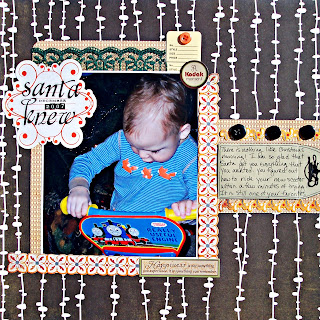

In the mean time....here are two of the LO's I made with this month's kit.


Subscribe to:
Posts (Atom)


 Posts
Posts


