Sunday, November 29, 2009

New Layout

Photobucket
Supplies: Cardstock: American Crafts, Bazzill. Pattern Paper: Cosmo Cricket and Basic Grey. Ribbon: Cosmo Cricket. Chipboard, Rub On and Mists: Maya Road. Chipboard Button: Jenni Bowlin. Brads: Target Dollar Spot. Fence Rub On: Martha Stewart. Stickers: Creative Imaginations.

I love that I was able to use up a few older items with newer paper. Love that!
Photobucket

Just saying hi. I couldn't sleep so I decided to actually do something rather than toss and turn. I may regret that tomorrow but oh well.

Hope everyone had a wonderful Thanksgiving and is enjoying their weekend.

Thanks so much for the comments about the online photo sites and stories about the page protectors. I feel much less stressed since I can start putting the album together instead of having everything out and about. Slowly I am finding a system that works to take my photos, edit them and print them quickly. I am thrilled that I decided to do this since I know I am taking the time to take photos that I wouldn't normally take!

Well that's it for now...I plan on working on a few projects right now...hope to share soon!

Tuesday, November 24, 2009

Ham and Project 365...

Photobucket

There she is! I got it done and even made some corn pudding too. I haven't had that in ages and since Colin was at school I figured it was safe to bake eggs in the house.

On another note, guess what happened?

I purchased We R Memory Keepers 4x6 page protectors to use in my American Crafts Modern Album. They didn't fit. So I figured that I needed a different album yet I'm cheap so I purchased a Pioneer D Ring album with a coupon. I got the album home, put in the page protectors...they don't fit. I figured "Great, now I have to purchase the expensive album." Just because I am a quick thinker, I brought along a page protector when I went to the store to purchase the expensive WRMK's Linen Album. I tried the protector and THEY DIDN'T FIT IN THERE EITHER!

So I called WRMK's and they explained that they were probably a bad batch and that I should return them. Well I purchased them in Hershey which is more than a hop, skip and a jump away. When I explained that it would be difficult to get there they told me that they could ship new ones if I covered the cost of shipping. The SHIPPING COST MORE THAN THE PAGE PROTECTORS!

That was the best that they could do. *sigh*

Needless to say I now have American Crafts 4x6 Page Protectors.

And I actually like them better.

Take that WRMK's!

Friday, November 20, 2009

So I Need A Ham In 11 Hours...

So if you see me in the grocery store in my PJ's don't stare too long, okay? :-)

I'm actually not sure how I'm going to make this happen but no matter what I'm sure it will be nuts and adventurous. At least it keeps life interesting, right?

I do have a good reason for procrastination.

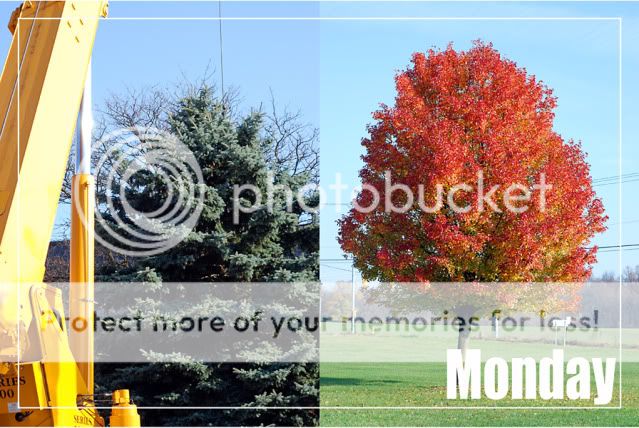
I have been trying to learn how to put two vertical photos on a 4x6 so I can use them in my Project 365 album. Once I get something like that in my head I don't let it go until I figure it out, on my own.

So I'm pretty sure I figured it out even thought there may be a better way.
Photobucket

I resized both photos to 2x3 and then moved them onto a blank 4x6 document in Photoshop. I used the grid feature and checked "snap to grid."

Even though everything was resized it still felt like I was stretching the photos and distorting their proportions.

(Although not so much in this photo, that tree is really that wonky and I made it a point to not waste time cropping and editing photos for this project. So even though those trees bother me a little side by side like that, I am letting it go. See, progress).

So I have been scrapbooking even though I haven't shared anything in awhile. I have 5LO's currently in progress, a few new LO's that I should be able to share soon, a project that will be posted on the Collage Press blog next week and oh yeah...that ham to bake.

Yeah...I don't know why I'm on the computer either.

Monday, November 16, 2009

Project 365...

I officially started today but Friday is the day I decided to use as day #1.

Photobucket

Nevermind that the photo that I am showing you is from Saturday, lol! I love that little bit of paint on his face! We went to Color Me In and painted pottery all afternoon on Saturday. It was totally fun and inspiring!

Expensive, but inspiring!

I have spent most of last night and tonight researching and deciding how I wanted to do this. I ended up purchasing We R Memory Keepers 4x6 photo sleeves and started printing the free download from last year's Project 365. I'll see if I can find a link to share with all of you.

The 4x6 page protectors do not quite fit in the American Crafts D Ring album so I plan on using a coupon and purchasing a We R Memory Keeper album for this project.

I'm excited and a bit nervous by the whole process. I really want to keep up with it and have already enjoyed putting together the first page. I'm excited to have a photo from each day even if there was poor lighting or not everyone was looking.

This will be a great way to keep up with all of the stories I want to tell but struggle with finding the time to scrapbook an entire LO. I can really see this as being my "storage binders" like in the Library of Memories class. I really want to make a greater effort to print photos this year so that everyone can enjoy them, not just the ones that made it into the scrapbooks.

So for those of you who did this last year and are in the home stretch, any tips?
Has anyone else completed this without the kit?
Are you planning on buying this year's version of Project Life?

Sunday, November 15, 2009

It Feels Good and Bad...

To stay up all night.

I haven't done this in awhile and I'm sure I will end up paying for this while at Hershey Park this afternoon.

Oh well at least I got some things done.

I worked with the new Home Front Line and my Collage Press stuff.

I "think" I figured out my photo dilemma. I processed 381 photos, just resized and sharpened using the batch process tool in PSE. I then deleted all of those extra photos from my organizer and reorganized my folders. I uploaded a few sample images different places to compare. Hopefully I will know for sure next week.

I created our Christmas cards and finally figured out how to use the move tool in PSE.

While reorganizing files I realized that I had downloaded the Project 365 journaling cards thinking that maybe I would use them for something and completely forgot about them.

So yeah...I'm planning on doing Project 365 in 2010.

It's a good thing since I have a feeling it's going to be an interesting one.

I'm just sayin' :-)

Friday, November 13, 2009

I Need Photo Help ASAP...

So I have enjoyed scrapbooking out of order, learning Photoshop Elements 3.0 and printing photos at home. One major downfall of that whole process is I have 3000 photos currently in my Photoshop organizer. I have asked Matt to backup my files for me for Christmas. That is really all that I want this year. I want someone else to research the "best way" and do it for me. (Don't panic, I do have most of these files on a thumb drive and photo CD's but I would like to have them be even more secure).

So in the mean time I would like to print all of these photos. Yep, all 3000. I then want to put them in albums. I've realized that I am the only one who gets to enjoy them as I look through my files deciding what I want to scrap.

So I need suggestions.
1. First I need to learn how to batch process my photos in PSE. I would like to at least sharpen all of these before printing and then if I reprint later to scrap I can adjust more if needed.
2. I need to learn how to save my files properly in PSE. I have noticed that some of my images saved at 200DPI. This of course resulted in grainy prints. When I hit "save as" I save as a jpeg using the highest option. I currently do not resize to 4x6 or anything so that I can print whatever size that I want in the future with the larger image.
3. I need suggestions of an online developer. I really would like my photos printed on professional paper. I have ordered from Shutterfly, Kodak and Kodax Pro and haven't been happy with any of them. I also realize that I may be having color issues related to how I am saving images.

So where do you get your photos printed? How do you save your photos and have you ever placed this large of an order somewhere?

I'm definitely going to do a small batch for comparison before doing the whole thing. If I place that large of an order and they are crap I will cry. Mostly because I have just wasted money, time, ink and paper.

So any info is greatly appreciated. :-)